

When to run it
Run the scorecard once a store is essentially done:- The punch list is 100% complete and Punch Status is Green.
- The store doesn’t already have a successfully submitted CPM scorecard — Hugo checks this first and tells you what it found, so you don’t double-submit.
Start it
One sentence names the store and what you want scored:“Run the CPM GC and Fixture Installer scorecards for Store 1507 — Norwalk, CA.”Hugo loads the scorecard procedure, verifies the store, and confirms the punch state before opening any questions.
Hugo prefills the store context
Before asking you anything, Hugo pulls the SiteFolio context for the store — deal type, grand-open date, GC and landlord contacts, site super, and CPM name — and shows it back to you. That’s the header every scorecard needs, filled without a single lookup.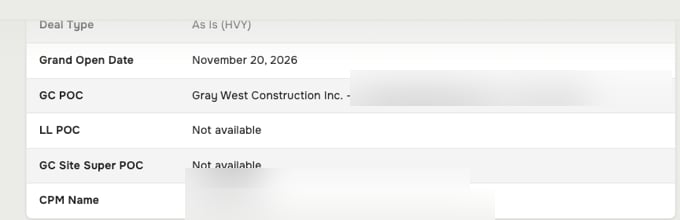
The store context Hugo prefills from SiteFolio — deal type, key dates, contacts, and CPM, no manual lookup.
If a field shows Not available, SiteFolio doesn’t have it yet — fill it in SiteFolio and re-run, or continue and note the gap. Hugo won’t invent a contact it can’t find.
Answer the GC rating questions
Hugo opens the General Contractor questions first, as a card with one tab per category — GC Communications, OFO Issues, Workmanship, Issue Resolution, Paperwork, and Site Super. Each question is a 0–5 rating, where 5 is Excellent and 1 is Poor. Not ready to score one? Choose Fill later and Hugo brings it back before submitting.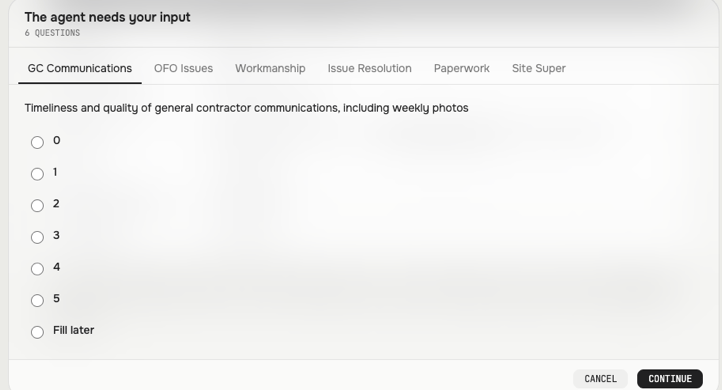
The GC rating card — one tab per category, each scored 0–5, with Fill later for anything you're not ready to answer.
Continue. Hugo records your answers and echoes them back so you can check the whole set before it moves on.
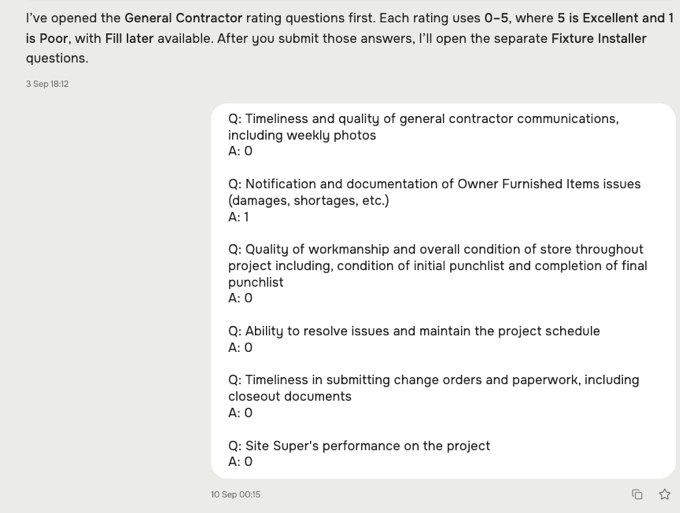
Hugo confirms the GC ratings you submitted, then opens the separate Fixture Installer questions.
Then the Fixture Installer questions
After you submit the GC ratings, Hugo opens the Fixture Installer questions as a separate set — same 0–5 scale, same Fill later option. Keeping them apart means each vendor is scored on its own record, not blended together.Submit
When both sets are answered, Hugo submits the completed scorecard and confirms it. Anything you marked Fill later is surfaced first, so nothing goes in half-scored.What to check before you submit
- Right store, right state — the header names the store you meant, and the punch list really is complete and Green.
- Both vendors scored — GC and Fixture Installer, unless you deliberately left one for later.
- No stray Fill later — clear anything you can answer now; Hugo lists what’s still open.