> ## Documentation Index
> Fetch the complete documentation index at: https://docs.surfaice.pro/llms.txt
> Use this file to discover all available pages before exploring further.
# GC Scorecard
> Rate general contractor and fixture installer performance at closeout — Hugo prefills the store context and walks you through the rating questions.
At the end of a project, the people who built the store get scored: the **General Contractor** and the **Fixture Installer**. The GC Scorecard turns that into a guided flow — Hugo pulls the store's context from SiteFolio, opens the rating questions one set at a time, and records your scores where they belong. No hunting for the store's deal type, contacts, or CPM name, and no separate form to fill by hand.
## When to run it
Run the scorecard once a store is essentially done:
* The **punch list is 100% complete** and **Punch Status is Green**.
* The store **doesn't already have a successfully submitted CPM scorecard** — Hugo checks this first and tells you what it found, so you don't double-submit.
## Start it
One sentence names the store and what you want scored:
> "Run the CPM GC and Fixture Installer scorecards for Store 1507 — Norwalk, CA."
Hugo loads the scorecard procedure, verifies the store, and confirms the punch state before opening any questions.
## Hugo prefills the store context
Before asking you anything, Hugo pulls the **SiteFolio context** for the store — deal type, grand-open date, GC and landlord contacts, site super, and CPM name — and shows it back to you. That's the header every scorecard needs, filled without a single lookup.
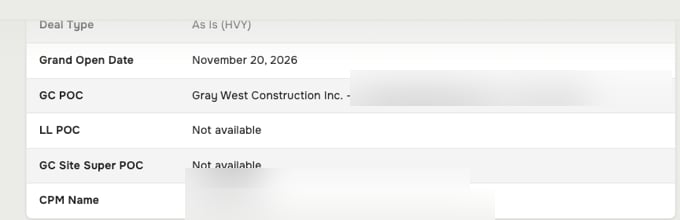 If a field shows **Not available**, SiteFolio doesn't have it yet — fill it in SiteFolio and re-run, or continue and note the gap. Hugo won't invent a contact it can't find.
## Answer the GC rating questions
Hugo opens the **General Contractor** questions first, as a card with one tab per category — GC Communications, OFO Issues, Workmanship, Issue Resolution, Paperwork, and Site Super. Each question is a **0–5** rating, where **5 is Excellent and 1 is Poor**. Not ready to score one? Choose **Fill later** and Hugo brings it back before submitting.
If a field shows **Not available**, SiteFolio doesn't have it yet — fill it in SiteFolio and re-run, or continue and note the gap. Hugo won't invent a contact it can't find.
## Answer the GC rating questions
Hugo opens the **General Contractor** questions first, as a card with one tab per category — GC Communications, OFO Issues, Workmanship, Issue Resolution, Paperwork, and Site Super. Each question is a **0–5** rating, where **5 is Excellent and 1 is Poor**. Not ready to score one? Choose **Fill later** and Hugo brings it back before submitting.
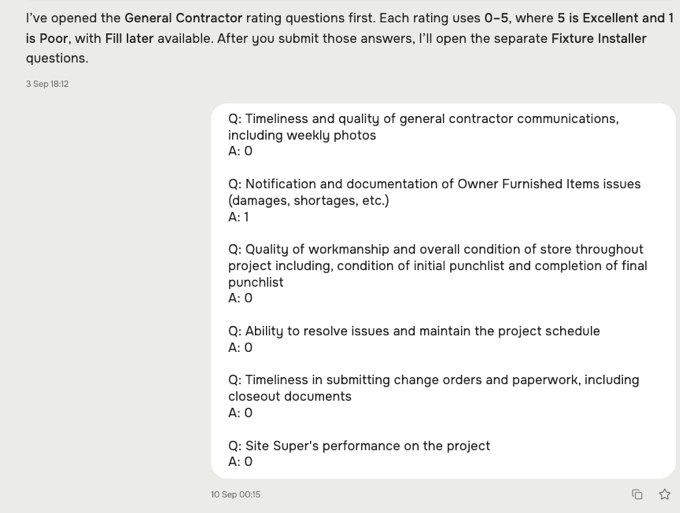
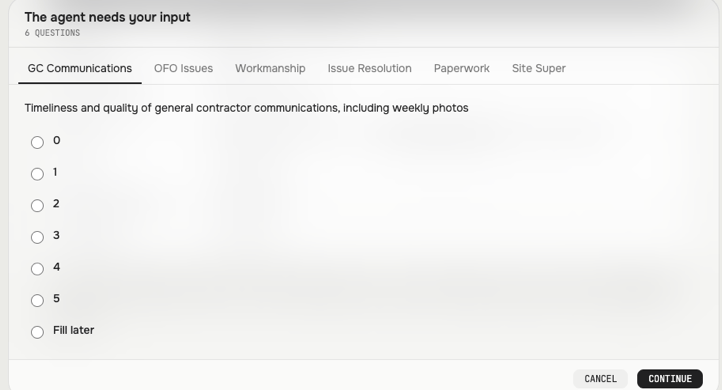 Tap a rating for each question and `Continue`. Hugo records your answers and echoes them back so you can check the whole set before it moves on.
 ## Then the Fixture Installer questions
After you submit the GC ratings, Hugo opens the **Fixture Installer** questions as a separate set — same 0–5 scale, same Fill later option. Keeping them apart means each vendor is scored on its own record, not blended together.
## Submit
When both sets are answered, Hugo submits the completed scorecard and confirms it. Anything you marked **Fill later** is surfaced first, so nothing goes in half-scored.
## What to check before you submit
* **Right store, right state** — the header names the store you meant, and the punch list really is complete and Green.
* **Both vendors scored** — GC *and* Fixture Installer, unless you deliberately left one for later.
* **No stray Fill later** — clear anything you can answer now; Hugo lists what's still open.
## Related
* [Store development skills](/skills/store-development)
* [Construction & closeout use case](/use-cases/construction-and-closeout)
* [Punch walk](/guides/punch-walk)
* [Working with Hugo](/guides/working-with-hugo)
## Then the Fixture Installer questions
After you submit the GC ratings, Hugo opens the **Fixture Installer** questions as a separate set — same 0–5 scale, same Fill later option. Keeping them apart means each vendor is scored on its own record, not blended together.
## Submit
When both sets are answered, Hugo submits the completed scorecard and confirms it. Anything you marked **Fill later** is surfaced first, so nothing goes in half-scored.
## What to check before you submit
* **Right store, right state** — the header names the store you meant, and the punch list really is complete and Green.
* **Both vendors scored** — GC *and* Fixture Installer, unless you deliberately left one for later.
* **No stray Fill later** — clear anything you can answer now; Hugo lists what's still open.
## Related
* [Store development skills](/skills/store-development)
* [Construction & closeout use case](/use-cases/construction-and-closeout)
* [Punch walk](/guides/punch-walk)
* [Working with Hugo](/guides/working-with-hugo)